Why this matters: Build a bounded helpdesk-triage workflow in n8n. You will replace a proposed “autonomous support agent” with an explicit responsibility matrix: deterministic intake, validation, authorization, SLA calculation, and routing; one constrained model call for ambiguity; and a human-approved side-effect step. The result becomes the first architecture artifact in your n8n AI Agent Build Portfolio.
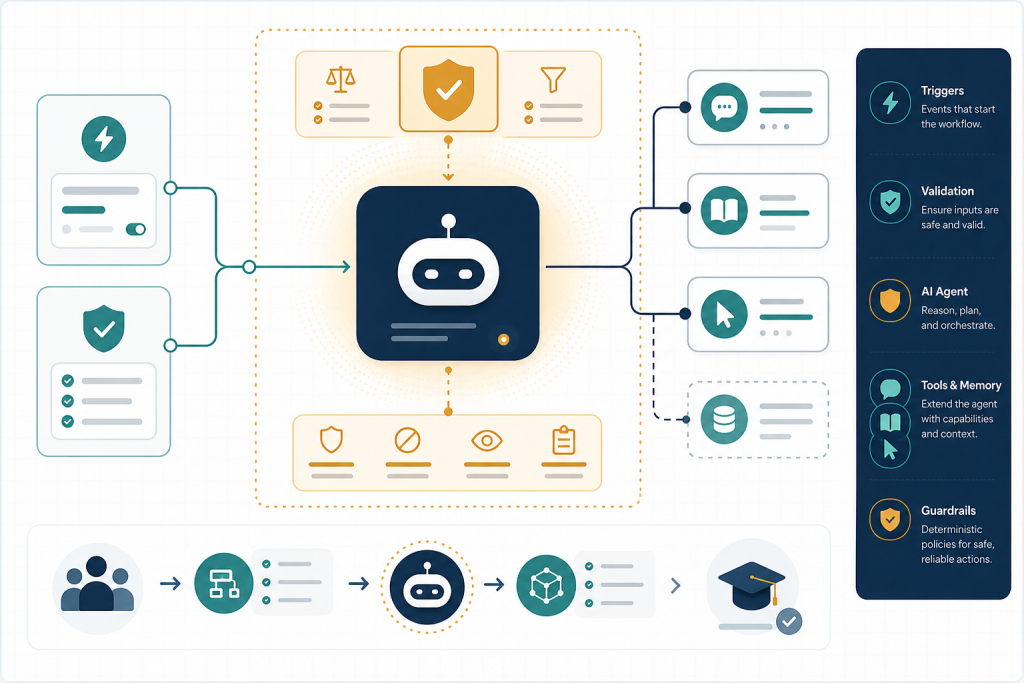
What you will be able to do
- Classify workflow responsibilities as deterministic, model-mediated, human-approved, or tool-executed.
- Configure and map a bounded Basic LLM Chain call in n8n using a constrained output contract.
- Implement deterministic validation, authorization, calculation, and routing gates around a model result.
- Design an approval and recovery path before enabling an external side effect in an n8n workflow.
Start with a failure you can prevent
Build decision: Your operations lead asks for an “autonomous IT support agent” that reads a ticket, decides priority, calculates an SLA, checks whether the requester may access a system, messages an on-call engineer, and closes routine requests. Do not begin by attaching Gmail, Slack, Jira, or other write-capable tools to an AI Agent. First build a workflow in which each responsibility has an owner you can inspect.
Create a new workflow named M1 — Bounded Helpdesk Triage. For this practice, use manual execution or a simple test trigger. Add an Edit Fields (Set) node—your UI may show a closely related label, so verify the current node name—to create this synthetic input:
| Field | Synthetic value |
|---|---|
| ticket_id | HD-1042 |
| requester_email | sam.lee@acme.example |
| requester_role | contractor |
| service | production-billing |
| message | I cannot access the billing dashboard. Month-end reporting is blocked. |
| received_at | 2026-09-09T14:00:00Z |
Now write a one-sentence workflow contract in a sticky note or workflow description: “Given one validated helpdesk ticket, produce a proposed category and urgency, then apply Acme policy to decide whether to notify an on-call engineer.” The word proposed matters. A model may interpret language; it is not the policy engine.
Create the node-by-node responsibility boundary
Before placing an AI node, create a responsibility matrix. It forces you to locate uncertainty rather than calling everything “agent reasoning.”
| Responsibility | Owner in this build | Reason | Evidence to inspect |
|---|---|---|---|
| Required field and email-format checks | Deterministic nodes | Rules are exact | Validation output and failure branch |
| Interpret issue category and urgency from natural language | Basic LLM Chain | Semantic ambiguity exists | Prompt and returned structured proposal |
| Is requester authorized for production-billing? | Lookup + IF | Policy and identity data control access | Lookup result, rule result |
| SLA due time | Code or deterministic date calculation | Exact calculation; same input must yield same result | Inputs and computed due time |
| Escalate when urgency is P1 or service is production-billing | IF/Switch policy gate | Explicit business threshold | Chosen branch |
| Send notification | Human-approved, credentialed tool step | External side effect | Approval and delivery result |
Make this design testable: change requester_role to contractor and define a synthetic lookup outcome of authorized=false. The workflow must stop notification regardless of the model’s words. This is the central boundary: the workflow engine executes connected nodes and expressions deterministically; a model call returns a probabilistic interpretation; a tool node actually performs the external action under its credential.
Use the matrix to answer the research questions. Probabilistic interpretation is appropriate for requests such as “month-end reporting is blocked” because urgency depends on meaning and context. Validation failures, unauthorized access, malformed API parameters, arithmetic, duplicate prevention, and routing thresholds become much easier to reproduce when they live outside the agent. Authorization and business-policy enforcement remain deterministic because neither a convincing explanation nor a high-confidence model label should grant access or authorize a message.
Implement a bounded model call—not an autonomous controller
Build the left half of the workflow now: Trigger → Edit Fields → validation IF → authorization lookup stub → authorization IF → Basic LLM Chain → output validation → policy IF. Keep all outputs in a stable record rather than overwriting source fields.
In your first validation IF, require non-empty ticket_id, requester_email, service, and message. Route failures to an Edit Fields node that creates status=REJECTED_INPUT and reason. Do not ask the model to repair missing identity or authorization data.
For the authorization lookup stub, add an Edit Fields node that outputs authorized=false for this contractor test. In a production workflow, replace this stub with a deterministic lookup against an approved source of truth, using a read-only credential where possible. Add an authorization IF: the false path creates status=DENIED_POLICY and ends; only true proceeds to the model.
Add a Basic LLM Chain and connect a supported chat model. n8n documents this node as a prompt plus optional response parser; when using a connected chat model, it also supports system and user messages. ([github.com](https://github.com/n8n-io/n8n-docs/blob/main/docs/integrations/builtin/cluster-nodes/root-nodes/n8n-nodes-langchain.chainllm.md)) Configure a system instruction that requires a compact JSON proposal only:
Classify the ticket. Return JSON with category (access|incident|how_to), urgency (P1|P2|P3), rationale (maximum 20 words), and missing_information (array). Do not authorize access, calculate an SLA, send messages, or claim that an action occurred.
Map only service and message into the user prompt, for example: Service: {{$json.service}}; Ticket: {{$json.message}}. n8n supports mapping by dragging input data into a parameter or using the expression editor; inspect the resolved preview before execution. ([docs.n8n.io](https://docs.n8n.io/data/data-mapping/data-mapping-ui/?utm_source=openai)) Do not include passwords, credentials, or an unrestricted policy document in the prompt.
After the chain, add deterministic output checks. Confirm category is one of the three allowed values and urgency is P1, P2, or P3. Invalid or unparsable output goes to status=MODEL_OUTPUT_INVALID, not to a default escalation. This converts a vague model failure into a visible, recoverable workflow state.
Keep policy and side effects explicit
Next, build policy after—not inside—the model response. Add an Edit Fields or Code node that deterministically sets an SLA target from the validated urgency: P1 = 4 hours, P2 = 8 hours, P3 = 24 hours. Then calculate sla_due_at from received_at. Document timezone and business-hours assumptions beside the node; this synthetic exercise uses elapsed hours in UTC only.
Add a policy IF whose condition is: authorized is true AND (urgency equals P1 OR service equals production-billing). Note what this does: the model can recommend urgency, but it cannot bypass authorization; the explicit IF implements the actual escalation threshold. Test three cases by editing input data: an authorized P3 how-to ticket, an authorized production-billing ticket, and this unauthorized contractor ticket. Inspect the input/output panel at every node and record the selected branch.
For the initial version, terminate the escalation branch in an Edit Fields node with notification_draft, side_effect_performed=false, and status=AWAITING_APPROVAL. This lets you test decisioning before connecting a write tool. When you later add email notification, map fixed recipient policy and validated fields into the Gmail node—never have a model produce raw recipient addresses or unverified API parameters.
n8n’s Gmail Message operation includes Send and Wait for Approval, which pauses execution until the recipient approves or disapproves; n8n recommends the Wait node for more complex approval flows. ([docs.n8n.io](https://docs.n8n.io/integrations/builtin/app-nodes/n8n-nodes-base.gmail/message-operations/)) Use such an approval only when a human must approve the actual outbound action. The approval request should display ticket ID, requester, service, final deterministic policy result, proposed urgency, recipient, and message body. On decline, record status=DECLINED; do not automatically re-request approval. On approve, send once and store an idempotency key such as ticket_id + action type in your authoritative action log before or alongside the external write, according to your organization’s transaction design. This guards against duplicate actions on retries.
Test, recover, and add evidence to your portfolio
Deliberately break the workflow. First, remove service: verify that the model node never runs. Second, change the model test output to an unsupported urgency such as P0: verify MODEL_OUTPUT_INVALID. Third, simulate an external notification failure only after you eventually attach a notification node: define whether the action is safe to retry, and never assume a retry is safe when a provider may already have accepted the send.
Create a separate error workflow when you introduce critical external operations. In n8n, an error workflow begins with Error Trigger and can be selected in the parent workflow settings; it receives execution context that can support alerting and diagnosis. ([n8n-docs.teamlab.info](https://n8n-docs.teamlab.info/flow-logic/error-handling/?utm_source=openai)) Review failed and retried runs in the Executions area. n8n documents two retry choices: retry with the currently saved workflow or with the original workflow, using the prior execution data. ([docs.n8n.io](https://docs.n8n.io/workflows/executions/all-executions/?utm_source=openai)) Your recovery note must state whether a human checks the action log before retrying.
Finally, evaluate the model boundary with a small synthetic dataset: five ticket messages, expected category, expected urgency, expected authorization result, and blank actual-output columns. Include ambiguous phrasing, missing fields, an unauthorized requester, and a production service. n8n light evaluations can use a data table or Google Sheet; the evaluation trigger runs one dataset row at a time, and its “Evaluate all” behavior runs each row sequentially. ([github.com](https://github.com/n8n-io/n8n-docs/blob/main/docs/build/integrate-ai/test-and-improve-ai-workflows/run-quick-evaluations.md)) Inspect category and urgency beside expectations, but also evaluate the deterministic invariants: no invalid input reaches the model, no unauthorized input reaches approval, and no evaluation run sends a real notification.
Portfolio artifact: Save a screenshot or export of the workflow plus your responsibility matrix, test dataset, three execution IDs/screenshots, and a one-page decision log titled “Why this is a chain plus deterministic workflow, not yet an agent.” In a later module, you can revisit the tool boundary: only grant an AI Agent a narrow read-only lookup tool when model-selected retrieval is genuinely needed, and preserve the deterministic authorization, policy, and approval gates outside it.
Build a Bounded Helpdesk Triage Workflow
Scenario: Applied practice scenario — Fictional Acme IT Helpdesk: Build a ticket-intake workflow that uses an LLM only to interpret a free-text issue, while n8n deterministically checks employee authorization, applies escalation policy, calculates SLA due time, and requires approval before any external notification is sent.
Work in a non-production workspace or with synthetic data. Do not connect any write-capable application credential during the first execution cycle. Build each deterministic branch first, execute it with the supplied test record, and capture node input/output evidence before adding the model call. Use the applied practice deliverables below as your submission package.
Self-review checklist
- Create the responsibility matrix and mark each decision Deterministic, Model, Human, or Tool.
- Build and execute the deterministic intake-to-policy path using the synthetic tickets.
- Map only approved fields into the Basic LLM Chain prompt; do not send unnecessary requester or internal data.
- Inspect the LLM output and add deterministic checks for allowed category and urgency values.
- Prove that a non-authorized requester cannot reach the notification branch, even if the model labels the ticket urgent or approved-to-send in prose or JSON fields you did not authorize as controls.
Key takeaways
- Use an LLM/chain for bounded semantic interpretation, not arithmetic, authorization, threshold routing, or final side-effect decisions.
- An n8n AI Agent can select and invoke connected tools; that does not remove the need for deterministic policy gates before any external write.
- Moving rules into explicit Edit Fields, IF, Code, lookup, and approval steps makes inputs, outputs, and failure branches inspectable and testable.
- Treat a model result as untrusted structured input: validate its shape and values before workflow routing or sending messages.
- Start with a no-side-effect prototype, evaluate it against a small labeled dataset, then add narrowly scoped tools and approvals.
Useful terms
- Deterministic step
- A workflow operation whose output follows defined rules, lookups, expressions, or calculations for a given input.
- Basic LLM Chain
- An n8n AI node used to supply a prompt to a model, with optional output parsing, for a bounded model call.
- AI Agent
- An n8n AI pattern in which a model can decide whether and how to use connected tools; it should not be treated as a replacement for policy enforcement.
- Tool execution
- The actual invocation of a connected capability, such as an API or app node, which may read data or create an external side effect.
Research & review note
This lesson is built from source-traceable research and reviewed before publication. AI Agentic School uses AI as a research and practice tool, not as a substitute for evidence or editorial judgment.
Sources & further reading
- https://docs.n8n.io/integrations/builtin/app-nodes/n8n-nodes-base.gmail/message-operations/
- n8n-docs/docs/integrations/builtin/cluster-nodes/root-nodes/n8n-nodes-langchain.chainllm.md at main · n8n-io/n8n-docs · GitHub
- Referencing data in the UI | n8n Docs
- Error handling | n8n Docs
- All executions | n8n Docs
- n8n-docs/docs/build/integrate-ai/test-and-improve-ai-workflows/run-quick-evaluations.md at main · n8n-io/n8n-docs · GitHub