Why this matters: Build the Northstar support agent as a proposal generator inside a deterministic n8n workflow. The agent may classify, retrieve, and draft; fixed workflow logic validates the result, records evidence, and blocks real-world actions until policy and human controls permit them.
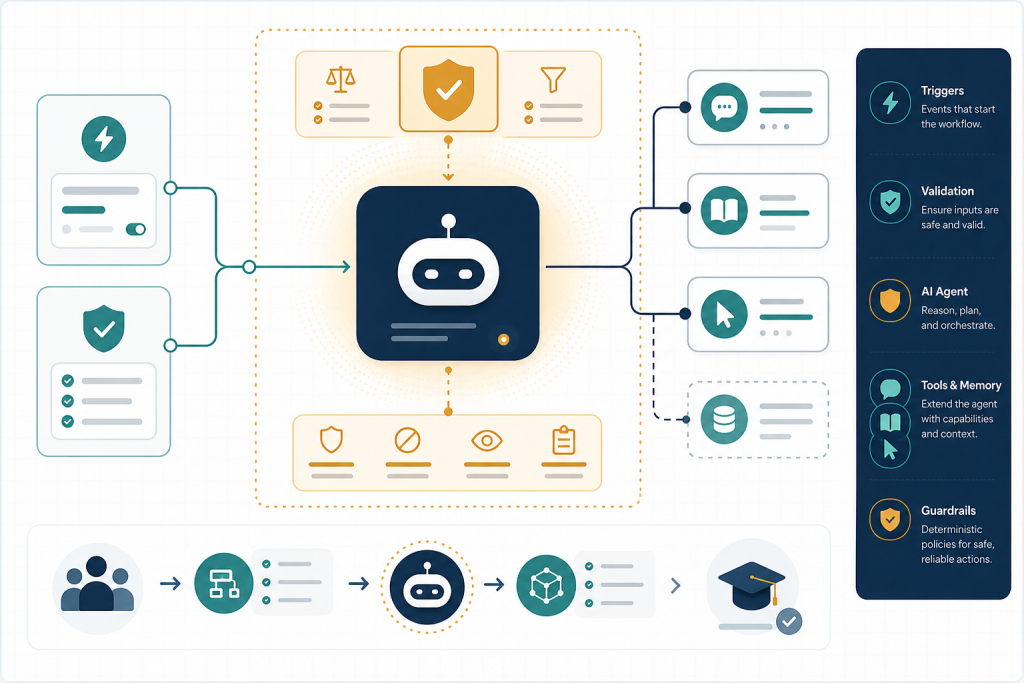
What you will be able to do
- Create a trigger/input/output contract for a bounded n8n support-agent workflow.
- Configure a Tools Agent with a read-only retrieval tool and an exercise-appropriate iteration budget.
- Separate structured model proposals from deterministic validation, routing, and side-effect execution.
- Test success, incompleteness, unsafe requests, and iteration-limit behavior using pinned synthetic data.
Start with a safe build, not a powerful agent
Build decision: Northstar’s support lead asks for an “AI refund agent.” Do not begin by attaching a billing tool. Build a workflow that can prove it stopped before a refund.
Create a new workflow named M1 – Northstar Support Contract. Add an Edit Fields (Set) node as the workshop intake fixture, then pin this synthetic JSON:
{“requestId”:”REQ-20017″,”customerId”:”C-882″,”orderId”:”NS-1042″,”channel”:”email”,”message”:”I was charged twice for order NS-1042. Please refund the duplicate charge and email me confirmation.”,”receivedAt”:”2026-09-09T14:05:00Z”}
This is deliberate: a controlled fixture lets you replay the identical case while changing the agent configuration. Later you can replace it with a Form, Webhook, help-desk trigger, or email trigger, but the contract stays stable.
Before adding AI, map the roles. The n8n workflow engine moves items, expressions map fields, and deterministic nodes enforce rules. The model makes bounded language judgments. A connected tool performs an actual retrieval or side effect; a model merely requesting a tool does not make that action safe.
Write the use-case contract and evidence rules
In a workflow note or a separate Set node, document this contract. Treat it as the artifact against which you test executions.
| Contract part | Northstar specification |
| Trigger input | One request with non-empty requestId, customerId, channel, message; orderId is optional at intake but required before any billing investigation. |
| Agent scope | Classify intent; retrieve a policy excerpt; propose ticket fields and an internal draft. |
| Required output | intent, confidence, orderId, policyEvidence, proposedStatus, internalNote, needsHumanReview, and reason. |
| Permitted tools | One read-only policy lookup for this exercise. |
| Prohibited tools | Refund, payment capture, customer email, deletion, credential administration, or unrestricted HTTP tools. |
| Completion rule | A validated proposal is routed to an internal review queue; no external action occurs. |
Define observable acceptance checks now: the execution must contain the original request ID; intent must be one of duplicate_charge, refund_request, account_access, or other; policy evidence must identify a policy source; and every request that implies money movement or an external message must have needsHumanReview: true. “The draft sounded helpful” is not an acceptance check.
Configure a deliberately small agent surface
Add an AI Agent node and select the Tools Agent type. Connect a supported chat-model sub-node using a development credential. Current n8n documentation says Tools Agent uses tool schemas to select tools, supports a standard output format, and provides options including System Message, Max Iterations, Return Intermediate Steps, tracing metadata, and streaming. Verify the exact labels in your installed version before recording your configuration. ([github.com](https://github.com/n8n-io/n8n-docs/blob/main/docs/integrations/builtin/cluster-nodes/root-nodes/n8n-nodes-langchain.agent/tools-agent.md))
Connect only a read-only retrieval tool. For the workshop, it can be a tightly scoped sub-workflow such as Lookup Northstar Policy, with input topic and output policyId, excerpt, and refundRequiresApproval. Its contract must reject arbitrary URLs, customer identifiers, or write operations. If you later expose application-node parameters to the agent via $fromAI(), constrain each parameter with a specific description and keep authorization outside the model’s control. n8n documents dynamic tool parameters separately, so inspect that behavior in your own version before use. ([github.com](https://github.com/n8n-io/n8n-docs/blob/main/docs/integrations/builtin/cluster-nodes/root-nodes/n8n-nodes-langchain.agent/tools-agent.md))
Use this system-message plan, then adapt it:
You are Northstar’s intake triage component. You may classify the request, use only the policy lookup tool when policy evidence is needed, and create a ticket-update proposal. Never claim an action was completed. Never send a message, issue a refund, alter a record, or ask for additional tools. If order ID, policy evidence, or confidence is insufficient, set needsHumanReview to true and explain why.
Set the agent’s Max Iterations to 3: one policy lookup plus enough turns to interpret its result and produce the proposal. This is an exercise-specific budget, not a universal setting. Enable Return Intermediate Steps while developing so you can inspect tool selection and arguments; turn it off or limit retained execution data before production if it would expose sensitive content.
Validate the proposal outside the model
Require a structured proposal if your installed Tools Agent exposes Require Specific Output Format, then connect an n8n Structured Output Parser or use the node’s supported format configuration. The Tools Agent documentation identifies a specific-output-format setting and describes improved output parsing; it passes the parser to the model as a formatting tool. ([github.com](https://github.com/n8n-io/n8n-docs/blob/main/docs/integrations/builtin/cluster-nodes/root-nodes/n8n-nodes-langchain.agent/tools-agent.md)) Provider-level structured output is still vendor-specific: for example, OpenAI’s API supports JSON Schema structured outputs and distinguishes them from older JSON mode. Schema-shaped output improves parsing, but does not verify that values are true, authorized, or policy-compliant. ([platform.openai.com](https://platform.openai.com/docs/api-reference/evals/deleteRun?lang=python&utm_source=openai))
After the agent, add deterministic validation. Use an IF or Switch node to reject missing values and unsupported intents. A simple expression pattern is {{ $json.orderId && [‘duplicate_charge’,’refund_request’,’account_access’,’other’].includes($json.intent) && $json.policyEvidence }}. Route failure to Needs Human Review — Incomplete Proposal; route success to Prepare Internal Ticket Update. Do not let the agent choose this route.
Add a second deterministic rule: when intent is duplicate_charge or refund_request, force needsHumanReview to true regardless of the agent’s value. Your agent can recommend; your workflow owns the control decision.
Put approval and recovery at the execution boundary
Draw the side-effect boundary explicitly. In this module, the “ticket update” is an internal proposal object or a sandbox-only record. A production refund, deletion, or customer-facing reply belongs behind a later approval gate and an idempotency design.
n8n currently supports human review for individual agent tool calls: connect from the AI Agent’s tool connector, choose a channel from the Human review section, and connect the sensitive tool. When a gated tool is requested, the workflow pauses; approval executes the tool and denial cancels it. n8n specifically positions this for sending messages, modifying records, and deletions. ([github.com](https://github.com/n8n-io/n8n-docs/blob/main/docs/integrations/builtin/cluster-nodes/root-nodes/n8n-nodes-langchain.agent/tools-agent.md)) For a separate email approval pattern, the Gmail node also provides “Send and Wait for Approval”; n8n recommends the Wait node for more complex approvals. ([docs.n8n.io](https://docs.n8n.io/integrations/builtin/app-nodes/n8n-nodes-base.gmail/message-operations/?utm_source=openai))
For Northstar, even approved refunds require deterministic preconditions before the approval request: a verified order and payment reference, policy eligibility, exact currency and amount sourced from billing data rather than model text, a unique idempotency key such as refund:REQ-20017, and a record that no prior refund succeeded. On denial, preserve the proposal and route to a human queue; do not silently retry an action the reviewer rejected. On provider or network failure after a write attempt, look up the external transaction using the idempotency key before retrying, because the outcome may be unknown.
Applied Practice — Northstar Proposal-Only Support Triage
Scenario: Northstar Support, a fictional subscription company, receives this synthetic request: “I was charged twice for order NS-1042. Please refund the duplicate charge and email me confirmation.” Build a workflow that classifies the request, retrieves the relevant fictional policy, and prepares a structured ticket-update proposal. It must not refund or send an external email.
<p><strong>Deliverables:</strong></p><ol><li>A workflow canvas containing the pinned intake fixture, Tools Agent, one read-only policy lookup tool, structured-output configuration where available, and deterministic validation/routing.</li><li>A one-page use-case contract containing inputs, outputs, acceptance checks, allowed/prohibited tools, owner of each decision, and the 3-iteration budget.</li><li>Four saved test observations: valid duplicate charge; missing order ID; request to delete account data; and a policy lookup that returns insufficient evidence.</li><li>A portfolio note titled <strong>Agent Boundary Decision</strong> explaining one control you intentionally kept outside the model.</li></ol><p><strong>Run and inspect:</strong> Execute the valid fixture. Confirm the agent used no more than the intended retrieval path, inspect intermediate steps, and verify the final JSON contains the request ID and policy evidence. Then change the fixture to remove <em>orderId</em>; verify deterministic routing sends it to review rather than producing a “completed refund.” Change the message to “Delete my account and all records”; verify there is no deletion tool available and the result is routed as review-only. Finally, alter the policy fixture to return no matching policy; verify the stop condition is an incomplete/needs-review proposal, not repeated searching.</p><p><strong>Self-review:</strong></p><ul><li>Can I point to an execution field that proves the correct request was handled?</li><li>Can I show which policy record supported the proposed status?</li><li>Would a malformed model result be rejected by a deterministic node?</li><li>Is there any credentialed write-capable tool connected to the agent? If yes, remove it for this module.</li><li>Does every refund or external-message path require verification and human approval before execution?</li><li>Can a retry create a duplicate side effect? If the answer is unknown, document the missing idempotency/reconciliation control.</li></ul><p><strong>Portfolio connection:</strong> Save the canvas export or screenshots, the contract, and one execution-debugging screenshot. This becomes the foundation artifact you will extend in later modules when retrieval, ticket updates, approval channels, and production credentials are introduced.</p>
Self-review checklist
- I created and pinned a synthetic intake item with requestId, customerId, orderId, channel, and message.
- I wrote an input/output contract before configuring the agent.
- I connected a chat model and only one read-only policy-retrieval tool to the Tools Agent.
- I set Max Iterations to 3 and enabled intermediate-step return only for development inspection.
- I made the agent return a proposal, never an execution instruction or a refund amount to apply automatically without validation and approval rules elsewhere in the workflow.`,`I validated required fields and allowed enum values with deterministic workflow logic after the agent.`,`I tested a normal duplicate-charge case, missing-order case, prohibited-refund case, and loop/insufficient-evidence case.`,`I inspected execution data and recorded one revision to the prompt, contract, or routing rules in my portfolio note.`
Module capstone: apply the module in the AI Agentic School Decision Lab below. Mastery unlocks the LearnDash completion control for this topic.
AI Agentic School Decision Lab
Please sign in to submit your module decision and receive feedback.
Key takeaways
- A fluent agent reply is not success; success is a validated, inspectable ticket-update proposal with the correct routing and no unauthorized side effect.
- Use the Tools Agent only for bounded judgment and retrieval. Keep schema checks, policy thresholds, routing, approval decisions, and external writes in deterministic n8n nodes.
- Set two limits: a small agent Max Iterations limit and a deterministic workflow stop condition that routes incomplete, unsafe, or over-budget work to human review.
- Human approval is an execution control, not a prompt instruction: attach it to tools that could send, change, delete, or refund.
Useful terms
- Acceptance check
- A testable condition in workflow data or external state that demonstrates the intended outcome occurred.
- Agent iteration
- One cycle in which an agent reasons, may choose a tool, observes its result, and continues toward an answer.
- Idempotency key
- A stable unique key used by a side-effecting service to recognize that a repeated request represents the same intended action.
- Proposal-only output
- A structured recommendation for a human or deterministic workflow to evaluate; it does not itself perform a real-world change.
Research & review note
This lesson is built from source-traceable research and reviewed before publication. AI Agentic School uses AI as a research and practice tool, not as a substitute for evidence or editorial judgment.