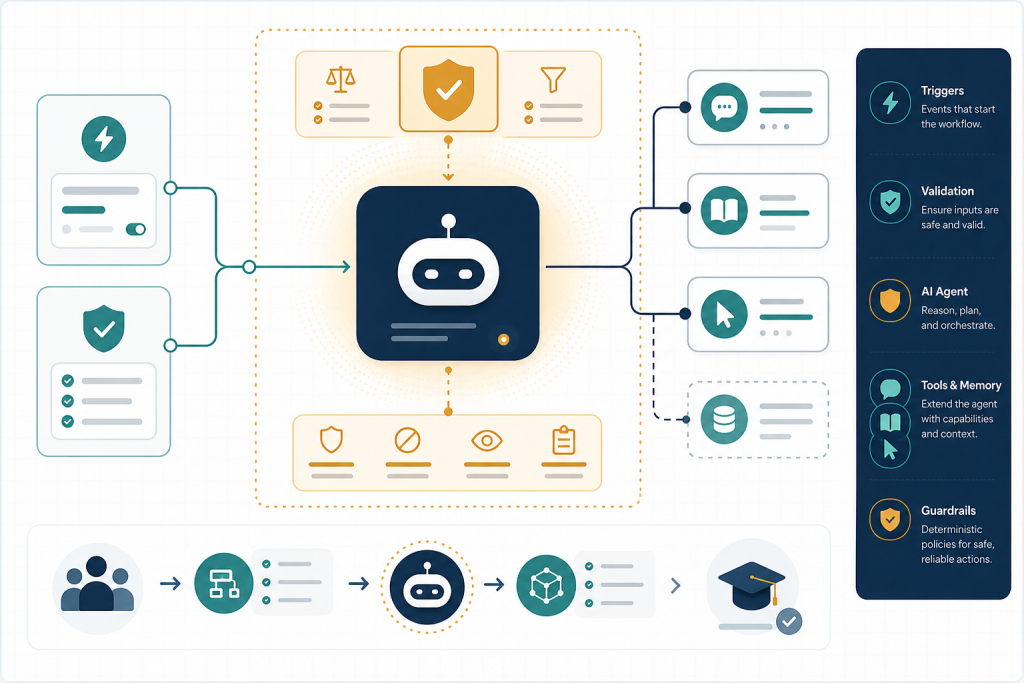
Establish the current n8n implementation model, select a bounded workshop use case, and separate model decisions from deterministic workflow responsibilities before learners grant the agent tools or side effects.
Module objectives
- Configure a minimal n8n AI Agent workflow using a trigger, mapped input, compatible chat model, and required tool connection.
- Classify proposed steps as deterministic workflow logic, direct model calls, chains, agent decisions, tools, or out-of-scope responsibilities.
- Specify the workshop agent’s trigger, inputs, outputs, success criteria, boundaries, and prohibited actions in an inspectable build plan.
- Test whether an agent is justified and replace unnecessary agent decisions with deterministic n8n nodes.
Detailed topic content is generated and researched separately so each topic maintains its own source trail.
This module in 6 slides
Click through for a quick overview, or use your arrow keys.
Put this module to work
Suggested time: 3 to 4 hours, including the build plan
Real-world scenario
A small online school gets about 40 support emails a day. Most are the same five questions: login trouble, refund requests, certificate downloads, course access after purchase, and invoice copies. The owner wants an n8n agent to answer them. Before anyone opens the AI Agent node, this module has you write down which of those five actually need judgment. Login and invoice requests can be handled by plain n8n nodes (look up the user, send the link). Only the vague, mixed-up emails need the agent. That decision alone cuts model cost and risk by more than half.
Step-by-step walkthrough
- Pick one real, repetitive task you or a client does every week. Write it as one sentence: trigger, input, desired outcome.
- List every step a person does today. Mark each one D (deterministic, same every time), M (needs a model to read or write language) or J (needs judgment about what to do next).
- Only the J steps are agent candidates. Everything marked D becomes a normal n8n node. Everything marked M can usually be a single Basic LLM Chain call.
- Write the build plan: trigger, input fields, output fields, what counts as success, three things the agent must never do.
- Build the smallest version: Manual Trigger, Set node with sample input, AI Agent with one chat model, and no tools yet. Run it five times and save the executions.
Common mistakes and how to fix them

Before AI, I spent about ten years as a Microsoft Certified Systems Engineer building networks: structured cabling, servers, Cisco routers and switches. The first rule there was that you draw the network before you plug anything in. Agents are the same. The diagram on paper (what goes in, what comes out, what is allowed to talk to what) saves you hours of debugging later. Every automation I run on my own course sites started as a one-page plan like the one in this module.
Try this
Take the support-email example above and decide which of the five request types you would route to the agent and which to plain nodes. Write down your reasons, then compare them with your own use case.
Before you move on
Your checklist is saved in this browser.
Agent opportunity scorer
Rate your idea on five factors and get a recommendation: agent, plain workflow, or simplify first. Your work is saved in this browser.
Autonomy envelope builder
List the actions your agent might take and sort each into Do alone, Ask first or Never. Your work is saved in this browser.