Why this matters: Build and test a bounded Python `create_agent` implementation, then map the equivalent JavaScript API without claiming feature parity. Learners make tool access, stopping conditions, response schema, runtime context, state, and persistence decisions explicit before adopting larger LangGraph workflows.
What you will be able to do
- Differentiate a LangChain high-level agent constructor from LangGraph orchestration primitives and optional LangSmith services.
- Implement a Python `create_agent` with a typed response format, trusted runtime context, and a read-only validated tool.
- Demonstrate the behavioral difference between `tools=[]` and a tool-enabled agent loop.
- Locate model/tool configuration and distinguish transient context, graph state, checkpoints/threads, and long-term storage concepts.
1. Establish the smallest safe boundary
Decision first: do we need an agent loop?
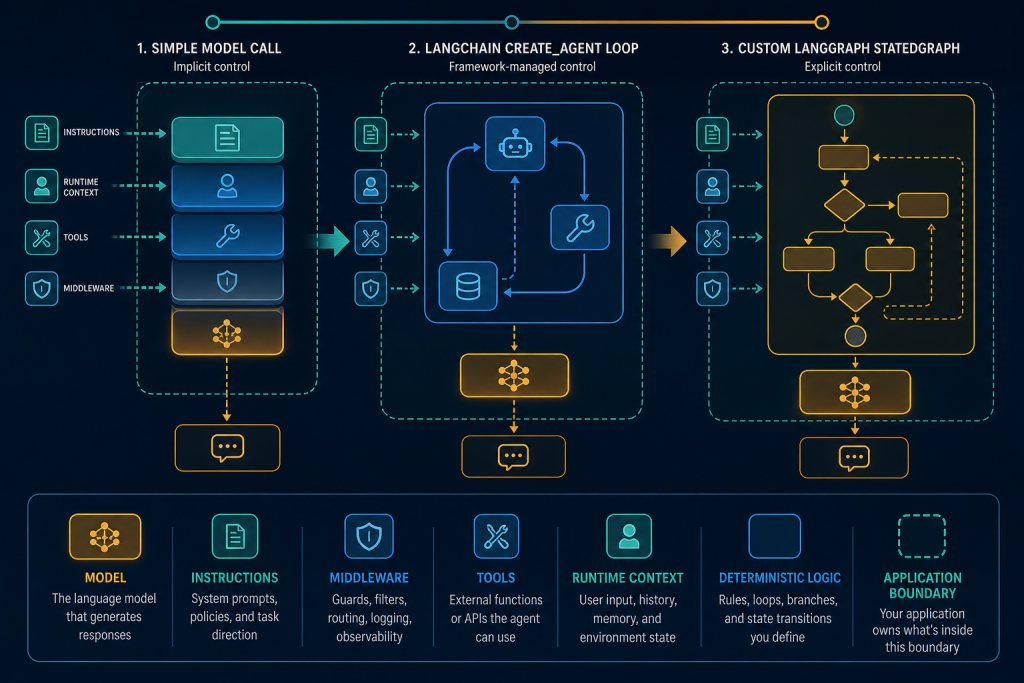
Your classifier has two different jobs. “Turn this note into a typed classification” needs no action capability. “What does product code ALPHA mean?” may need one bounded lookup. Do not begin by drawing a custom multi-node graph or granting a search tool. Start with LangChain’s current high-level constructor: langchain.agents.create_agent. It creates an agent graph that loops over model and tool calls until a stopping condition is met; the returned object follows LangGraph graph invocation patterns such as invoke and streaming. ([reference.langchain.com](https://reference.langchain.com/python/langchain/agents/factory/create_agent?utm_source=openai))
Boundary statement: LangChain’s create_agent packages a standard agent loop and middleware surface. LangGraph is the lower-level orchestration/runtime layer beneath it and is where you move when your application needs explicit nodes, state ownership, routing, interrupts, checkpointing, or multi-agent contracts. LangSmith is optional observability, evaluation, and deployment infrastructure; open-source agent execution does not require it. This exercise remains a single compiled agent graph, deliberately avoiding unnecessary stateful complexity.
Define the contract
- Input: a user message plus trusted caller context containing a tenant ID.
- Allowed action: read one value from a fixed catalog; no HTTP, database writes, files, or shell.
- Output: a validated
ReleaseClassificationobject. - Hard operational limit: cap graph steps with invocation configuration; treat this as a backstop, not normal control flow.
- Deterministic work stays outside the LLM: tenant authorization, catalog allow-list lookup, input normalization, rate limits, and any decision to send/write/approve.
2. Wire two agents and make their difference observable
Implement the reference agent
The code uses a model identifier from the environment so that the workshop does not pretend a particular provider is universal. Your selected provider integration and credentials are prerequisites. The model must support tool calling for the second agent. The first agent has no such requirement because it receives tools=[].
import os
from dataclasses import dataclass
from typing import Literal

from pydantic import BaseModel, Field
from langchain.agents import create_agent
from langchain.tools import tool, ToolRuntime

# Runtime context: trusted, per-invocation dependency injection.
# It is not message history and is not persisted by itself.
@dataclass
class RequestContext:
    tenant_id: str

class ReleaseClassification(BaseModel):
    category: Literal["feature", "fix", "breaking", "unknown"]
    product_code: str | None = Field(default=None)
    rationale: str

CATALOG = {"ALPHA": "Internal analytics product", "BETA": "Billing service"}

@tool
def product_lookup(code: str, runtime: ToolRuntime[RequestContext]) -> str:
    """Look up one approved product code in this tenant's read-only catalog."""
    # Deterministic authorization and validation belong here, not in the prompt.
    if runtime.context.tenant_id != "workshop-tenant":
        return "Lookup denied: unauthorized tenant."
    normalized = code.strip().upper()
    if normalized not in CATALOG:
        return "Unknown approved product code."
    return CATALOG[normalized]

SYSTEM = """You classify release notes. Use product_lookup only when a product
code is needed. Never claim a lookup occurred unless its tool result appears in
messages. Return the requested structured classification."""

model = os.environ["CHAT_MODEL"]  # Example form depends on installed provider.

# Baseline: exactly one model node; no tool-calling capability.
empty_tool_agent = create_agent(
    model=model,
    tools=[],
    system_prompt=SYSTEM,
    response_format=ReleaseClassification,
    context_schema=RequestContext,
)

# Action-capable variant: model may request the read-only tool, then continue.
lookup_agent = create_agent(
    model=model,
    tools=[product_lookup],
    system_prompt=SYSTEM,
    response_format=ReleaseClassification,
    context_schema=RequestContext,
)

request = {"messages": [{"role": "user", "content": "ALPHA adds CSV export."}]}
run_config = {"recursion_limit": 6}  # Defensive graph-step budget.
context = RequestContext(tenant_id="workshop-tenant")

baseline = empty_tool_agent.invoke(request, config=run_config, context=context)
with_lookup = lookup_agent.invoke(request, config=run_config, context=context)

print(baseline["structured_response"])
print(with_lookup["structured_response"])
print(with_lookup["messages"][-1])
Annotate it in your repository: model chooses the chat model; tools grants callable capabilities; system_prompt supplies developer instructions; response_format establishes the output contract; middleware is absent intentionally; context_schema types transient trusted dependencies; and default agent state contains append-only messages. Python custom state is currently a TypedDict extension of AgentState; LangChain recommends middleware-scoped state extensions over passing state_schema directly. ([docs.langchain.com](https://docs.langchain.com/oss/python/langchain/agents))
Passing tools=[] produces a single LLM node with no tool-calling capability. Passing [product_lookup] enables the model/tool loop, including potentially sequential or parallel tool requests. The normal loop ends when the model stops requesting tools; the recursion budget protects the host application if behavior is pathological. Do not equate a recursion limit with a business rule: a production system should additionally impose policy-specific call budgets, timeouts, and request-cost limits.
3. Test behavior, not just a final sentence
Inspect final state and test the graph paths
invoke takes a state update, here {"messages": [...]}, and returns final graph state. With a response format, Python returns the validated object in result["structured_response"]; otherwise, consume the final AI message from messages. A plain schema lets LangChain choose provider-native structured output when supported and otherwise use a tool strategy. That selection is capability dependent, so test the actual model/provider combination rather than asserting native JSON-schema support in portable code. ([docs.langchain.com](https://docs.langchain.com/oss/python/langchain/agents))
- No-tool path: invoke
empty_tool_agentwith “Classify: Fix crash on login.” Assertstructured_response.category == "fix". Inspect messages: there must be no tool message. - Lookup path: invoke
lookup_agentwith the ALPHA request. Assert the classification containsproduct_code == "ALPHA", and assert a tool result exists before the final answer. Do not assert exact prose rationale. - Rejected-input path: use an unknown code or unauthorized tenant. Assert the tool returns a denial/unknown result and the final schema remains valid. This tests that deterministic code, not LLM compliance, enforces access.
- Termination path: use an ambiguous prompt that may entice repeated lookup. Confirm your configured recursion budget causes a handled failure/termination path in your host application. Log the input, model/provider, tool-call count, and terminal exception/status.
For live diagnosis, call agent.stream(...) or stream_events(...) and render model/tool updates. LangChain documents that invoke yields the final response while streaming exposes intermediate messages and tool activity. If you enable LangSmith tracing, use traces to inspect these spans and later attach datasets/evaluations; it is an optional service layer rather than a change in your graph’s authority model. ([docs.langchain.com](https://docs.langchain.com/oss/python/langchain/agents))
4. Hold the line before adding durable or side-effectful behavior
State, context, persistence, and the JavaScript boundary
Do not add a checkpointer to this first task. Runtime context is per-run dependency injection for tools and middleware. Agent state holds messages and any declared short-term fields during execution. A checkpointer plus a stable thread_id is what makes state/checkpoints available across invocations; locally, an InMemorySaver is explicitly a local demonstration choice. A longer-term store is a separate persistent-memory design, with retention, tenancy, and access controls of its own. ([docs.langchain.com](https://docs.langchain.com/oss/python/langchain/runtime))
JavaScript/TypeScript uses camelCase createAgent from langchain, takes model, tools, prompt, middleware, responseFormat, contextSchema, and stateSchema, and invokes with await agent.invoke({ messages: [...] }). Tools are typically defined with tool(..., { name, description, schema: z.object(...) }); structured schemas are commonly Zod and the result key is structuredResponse. Unlike Python, do not copy snake_case parameter names or result keys into TypeScript. The current JS reference also notes an optional checkpointer and non-persistent runtime context. ([reference.langchain.com](https://reference.langchain.com/javascript/langchain/index/createAgent?utm_source=openai))
Finally, do not deploy this demonstration as though it has approval workflow semantics. If you later introduce a write tool, require deterministic authorization and human approval before the side effect. LangChain’s human-in-the-loop middleware can pause tool execution, but resume authorization and durable checkpoints are deployment/application responsibilities. Current terminology is LangSmith Deployment and its Agent Server; Agent Server manages assistants, threads, and runs and includes persistence/task-queue infrastructure in a deployment. The LangGraph CLI supports local development and deployment workflows, but it does not eliminate the need to configure credentials, databases, queues, and access controls appropriate to your hosting model. ([docs.langchain.com](https://docs.langchain.com/oss/python/langchain/agents))
Sources
Source list
- LangChain Python Agents and current
create_agentbehavior. ([docs.langchain.com](https://docs.langchain.com/oss/python/langchain/agents?utm_source=openai)) - LangChain Python Runtime Context guidance. ([docs.langchain.com](https://docs.langchain.com/oss/python/langchain/runtime))
- LangChain JavaScript
createAgentand parameter reference. ([reference.langchain.com](https://reference.langchain.com/javascript/langchain/index/createAgent?utm_source=openai)) - LangChain JavaScript structured-output behavior. ([docs.langchain.com](https://docs.langchain.com/oss/javascript/langchain/structured-output?utm_source=openai))
- LangSmith Deployment, Agent Server, and LangGraph CLI documentation. ([docs.langchain.com](https://docs.langchain.com/langsmith/deployment?utm_source=openai))
Practicum: Build a Bounded Release-Note Classifier
Scenario: You are shipping an internal “release-note classifier.” It may classify a short release note and may look up one approved product code from a small in-process catalog. It must never write data, access the network, or call arbitrary functions. A common failure is starting with a broad tool-enabled agent, then discovering that a vague question triggers repeated lookup attempts, unexpected provider capability assumptions, or output that downstream automation cannot parse. Build the smallest bounded agent first, make its graph state visible, and prove the no-tool and tool-loop paths separately.
Work in pairs. One learner drives the code; the other is the safety reviewer who must approve each tool capability, expected graph path, and test assertion. Keep the tool read-only. Submit the source file, a short state-path log for each test, and a one-paragraph explanation of why persistence was intentionally deferred.
Self-review checklist
- Create a virtual environment and install the current `langchain` package plus the provider integration required by your chosen `CHAT_MODEL`. Set that provider credential in your environment; never hard-code it.
- Implement the catalog tool exactly as a read-only allow-list lookup. Test malformed, unknown, and normalized product codes.
- Run the empty-tool agent first and inspect its final `messages` state.
- Run the tool-enabled agent with a catalog question; stream updates or inspect messages to identify the AI tool call and the subsequent tool result.
- Set `recursion_limit` in invocation config as a deterministic budget. Trigger an intentionally ambiguous request and confirm the run terminates rather than becoming unbounded work in your application design.([docs.langchain.com](https://docs.langchain.com/oss/python/langchain/agents)) ([docs.langchain.com](https://docs.langchain.com/oss/python/langchain/agents))
Key takeaways
- `create_agent` is the high-level LangChain constructor; its returned object is a LangGraph-backed compiled agent graph that accepts state updates through `invoke` and supports graph-style streaming.
- `tools=[]` is deliberately model-only: it has one LLM node and no tool-calling loop. Supplying tools creates the ReAct-style loop: model → requested tool(s) → model, stopping when the model produces no further tool calls.
- Bound an agent with deterministic application limits and tool validation. A prompt asking the model to “use a tool only once” is not a control plane.
- Keep transient caller data in runtime context, execution/conversation data in graph state, and cross-turn durability only behind an explicitly configured checkpointer or store.
- Structured output is an interface contract for downstream code, not a reason to assume every provider offers identical native JSON-schema behavior.
Useful terms
- Compiled agent graph
- The runnable LangGraph-backed graph returned by LangChain’s agent constructor.
- Runtime context
- Typed, trusted per-invocation dependencies injected into tools and middleware; it is distinct from persisted graph state.
- Graph state
- The data managed by graph execution. Default agent state includes append-only message history.
- Checkpointer / thread
- The mechanism and identifier used to retain and recover graph checkpoints across invocations when configured.
Research & review note
This lesson is built from source-traceable research and reviewed before publication. AI Agentic School uses AI as a research and practice tool, not as a substitute for evidence or editorial judgment.