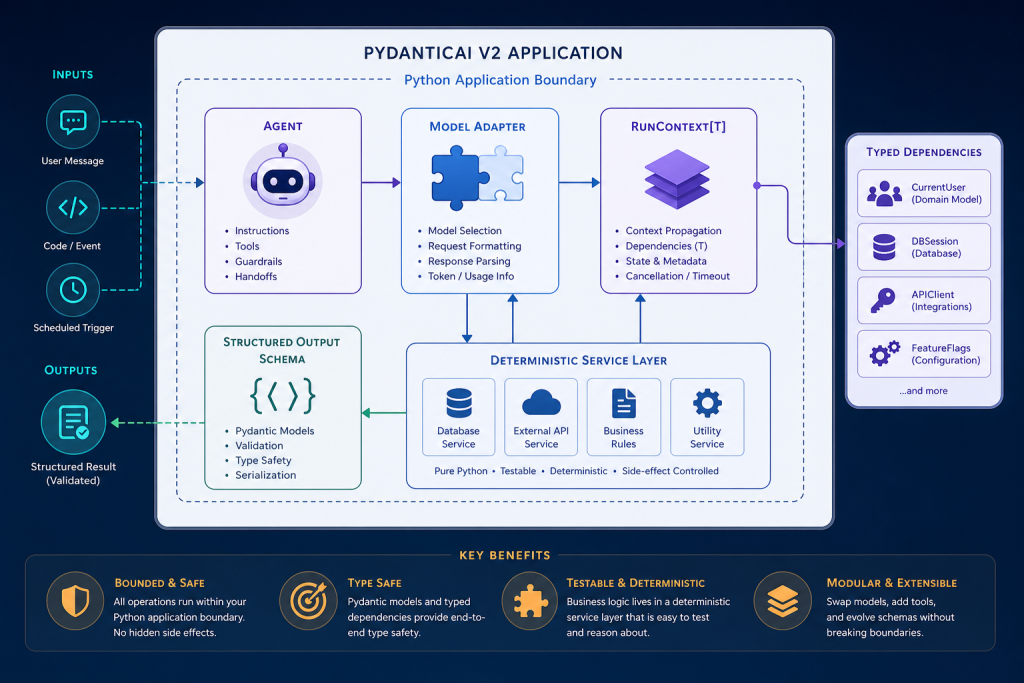
Establish an accurate PydanticAI V2 mental model and implement the smallest useful typed agent while separating probabilistic model decisions from deterministic application responsibilities.
Module objectives
- Configure and run a small PydanticAI V2 Agent in Python with a selected model or TestModel fallback.
- Implement dynamic instructions that consume typed dependencies through RunContext without placing secrets in prompts.
- Define and validate a structured output_type and consume AgentRunResult.output with correct static typing.
- Classify use-case responsibilities as deterministic application logic, agent decisions, tool operations, or direct model calls using explicit criteria.
Detailed topic content is generated and researched separately so each topic maintains its own source trail.
This module in 6 slides
Click through for a quick overview, or use your arrow keys.
Put this module to work
Suggested time: 3 to 4 hours
Real-world scenario
A developer reaches for an agent to extract five fields from an invoice email. With PydanticAI, the better answer may be a single typed model call: one Agent with an output type and no tools. This module builds your foundation: agents, models, instructions, dependencies, structured outputs and runs, and the judgment to know when a direct call is simpler.
Step-by-step walkthrough
- Install PydanticAI in a fresh virtual environment and confirm the current version from the official docs.
- Create a minimal Agent with a model, instructions and a Pydantic output type, and run it.
- Add a dependencies type to pass in things like a database client or user ID, instead of using globals.
- Inspect the run result: output, messages and usage.
- Write down when you would use a single typed call versus an agent with tools.
Common mistakes and how to fix them

I like typed agents because they behave like the rest of my code: clear inputs, clear outputs and errors you can catch. When I build integrations for my own platforms, the typed boundary is what makes AI safe to plug into real systems.
Try this
Write the invoice extraction as a typed call, then as an agent with a tool. Compare code size, cost and reliability.
Before you move on
Your checklist is saved in this browser.
Agent opportunity scorer
Rate your idea on five factors and get a recommendation: agent, plain workflow, or simplify first. Your work is saved in this browser.
Autonomy envelope builder
List the actions your agent might take and sort each into Do alone, Ask first or Never. Your work is saved in this browser.