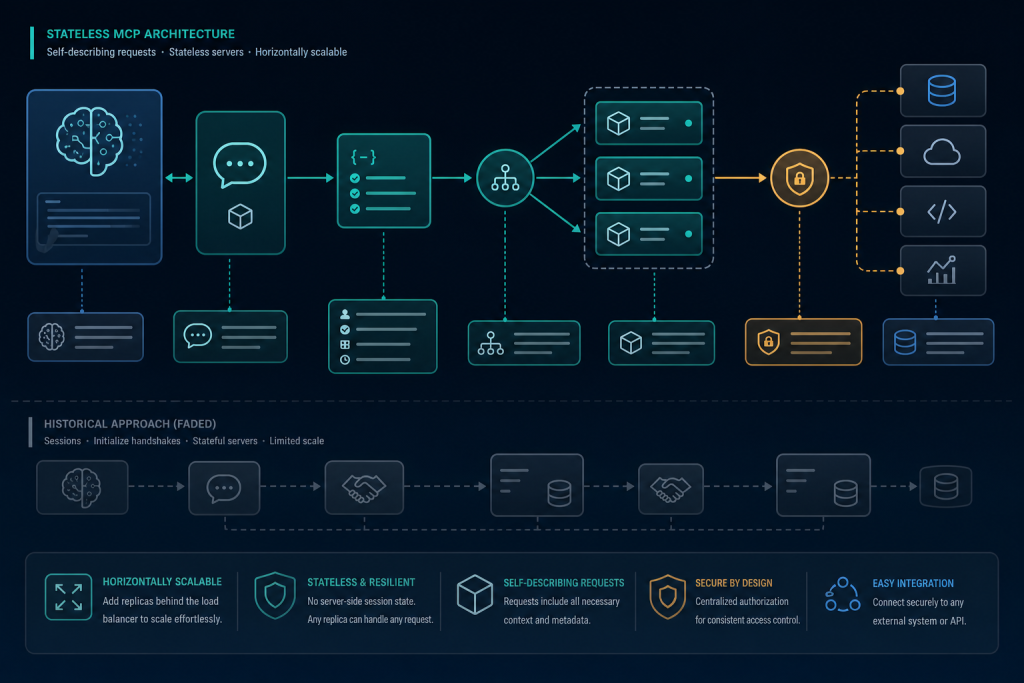
Establish a current, version-accurate MCP mental model and enable learners to decide when MCP is the right interoperability boundary.
Module objectives
- Label the host/application, model, MCP client, MCP server, transport, authorization components, protocol messages, and external systems in an architecture diagram with no role-boundary errors.
- Trace a 2026-07-28 request from host intent through the client, transport, server, and external system to the returned result.
- Compare optional server/discover discovery with direct first-request operation and identify the metadata required on modern requests.
- Classify protocol features as current, deprecated, removed, extension-based, SDK-specific, host-specific, or historical using official lifecycle evidence and dates.
Detailed topic content is generated and researched separately so each topic maintains its own source trail.
This module in 6 slides
Click through for a quick overview, or use your arrow keys.
Put this module to work
Suggested time: 3 to 4 hours
Real-world scenario
A developer wires an MCP server into a desktop AI app and then cannot work out why a tool call fails. Is it the model, the host, the client, the transport or the server? Without a clear mental model of the roles, every bug looks like an AI bug. This module gives you that model, using the current protocol version, so you can point at any message and say exactly which component sent it and why.
Step-by-step walkthrough
- Draw the architecture for one real integration: host application, model, MCP client, MCP server, transport, authorization components and the external system.
- Trace one request end to end, writing down each message and which role sends and receives it.
- Note which metadata your requests must carry under the current protocol version and how discovery works.
- Sort the features you plan to use into current, deprecated, extension-based, SDK-specific or host-specific, and record the source and date you checked.
- Decide whether MCP is the right boundary for this integration, or whether a direct API call would be simpler.
Common mistakes and how to fix them

I manage my own WordPress course sites through an MCP connector, which is how much of the work on this school gets done. The thing that made it click for me was the same thing that made networking click years ago: knowing exactly which box is responsible for each hop. Draw the roles once, carefully, and debugging becomes a matter of finding which hop failed.
Try this
Point your host at a simple public MCP server, make one tool call, and identify every message in the log by role.
Before you move on
Your checklist is saved in this browser.
Agent opportunity scorer
Rate your idea on five factors and get a recommendation: agent, plain workflow, or simplify first. Your work is saved in this browser.
Autonomy envelope builder
List the actions your agent might take and sort each into Do alone, Ask first or Never. Your work is saved in this browser.